Audit Log and Devices
For: Staff with AUDIT_LOG_READ for Audit Log or USAGE_STATS_VIEW for Devices. Checked: Vega v1.126.2, 8 October 2026.
Audit Log
The Audit Log is an insert-only record of system actions. It supports investigation but does not grant permission to change the underlying records. Safety report submitters and details are hidden unless the viewer has the required Safety authority.
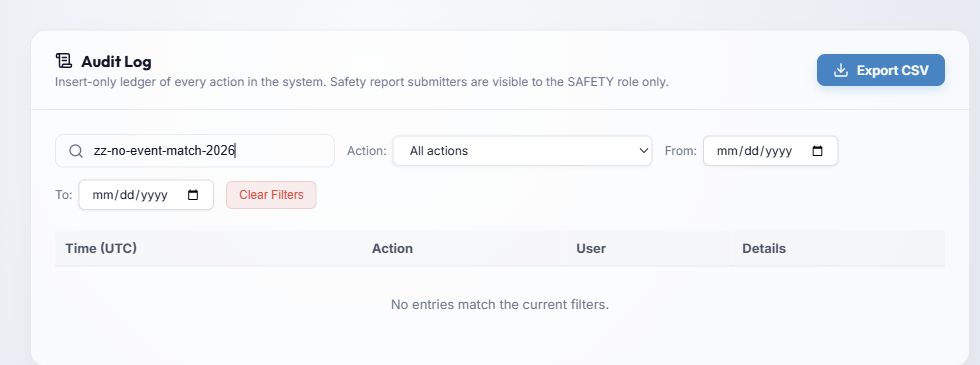
- Export CSV downloads the current ledger selection. Check the selected filters before exporting because this file can include personal and operational details.
- Search details, user, action narrows the ledger; Action selects an event type; From and To set the date window. Search updates shortly after you stop typing.
- Clear Filters removes all search and date/action restrictions. The list shows Time (UTC), Action, User, and Details, with page controls for more entries. The screenshot uses a deliberately unmatched search so no person appears.
In populated results, Confidential (SAFETY only) means the actor and details are redacted for this viewer. A blank or system/anonymous actor does not necessarily mean an event is missing.
For a review, filter to the relevant dates and action, inspect the UTC timestamps, then export only if a CSV is needed. A displayed count may be capped for a very large result set; narrow the filters to inspect a specific period.
Devices
Devices is aggregate usage information, not a list of named employees. It helps identify the device and browser setups that open Vega.
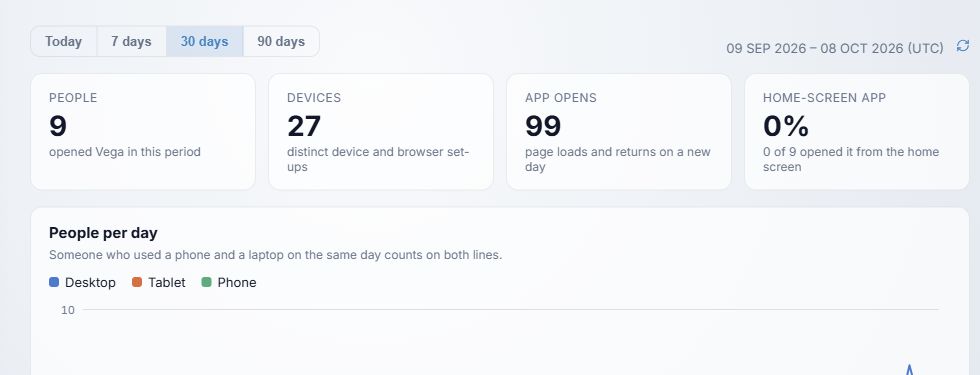
- Select Today, 7 days, 30 days, or 90 days. The default is 30 days unless this browser saved a previous selection. The date range is in UTC; Refresh fetches it again.
- People counts distinct people active in the period; Devices counts distinct device/browser setups; App opens counts page loads and returns on a new day. Home-screen app shows people who opened an installed app icon as a share of active people.
- People per day appears for longer periods. A person who uses a phone and laptop on one day appears on both device lines.
Below the pictured chart, review Device type, Operating system, Operating system version, Browser, Browser version, Opened as, Screen size, and Browser language. Use Show all where a ranked list is collapsed. One person can appear under multiple values, so percentages can total more than 100%.
If the view is empty, nobody has opened Vega during that period or collection began only after this version was installed. Try a longer period and Refresh before drawing a conclusion.