Notify recipients about an existing document
For: Document controllers with edit access to the document's section
Before you start: Confirm that the document's current distribution is correct.
Last checked: 7 October 2026, fictional local demo v1.126.2 and current notification code
Notify Recipients re-announces the current published document. It does not publish a revision and does not invalidate signatures already collected. Use it after a silent upload or when the existing audience needs a reminder. Changing a document's details is a separate, silent save.
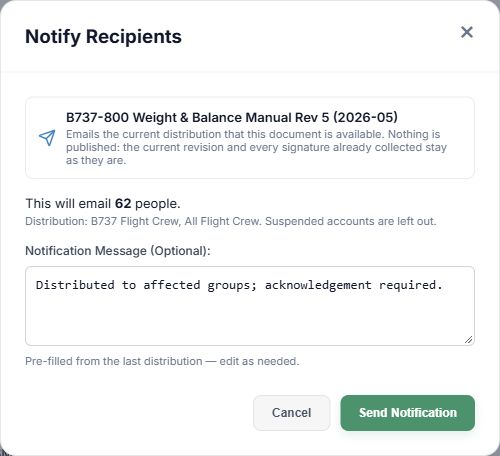
Figure 1. 1 — Document: verify the file being announced. 2 — Recipient preview: check the count and groups; suspended accounts are excluded. 3 — Notification Message (Optional): starts with the last distribution note when available. 4 — Send Notification: sends to the current audience. Cancel or × closes without sending.
- Find the document and select its Notify Recipients icon.
- Wait for the preview. Check This will email … people and the distribution group names. If nobody would be emailed, Send Notification stays unavailable; add a distribution group in Edit Document first. The preview may also show when the last announcement went out and by whom.
- Edit Notification Message (Optional) if useful. It can be pre-filled from the last distribution. Leaving it blank uses the standard announcement without a custom note.
- Select Send Notification once, then check the success count. Cancel or × does nothing to the document or its signatures.
The company may limit repeated announcements to one per document within a configured interval. If the dialog says Already announced and gives a next allowed time, the send button stays unavailable until that time. This limit does not prevent publication of a genuine new revision.
When Edit Document Details adds a group, individual, or folder access, Vega can instead show Notify New Recipients? after saving. Send Notification there sends only to the newly added audience; Skip leaves the edit saved without sending. Use the separate Notify Recipients button when you deliberately want to reach the whole current distribution.
Email delivery and document acknowledgement are different outcomes. Use Read tracking to check who was reached and who signed.