Company Settings: save, defaults, email, and security
For: Administrators with SETTINGS_MANAGE. Checked: Vega v1.126.2, 8 October 2026.
Open Admin Console → Settings. These are company-wide controls. The visible sections depend on the company's licence. First check the value shown in your own portal: an administrator may have customized it, and environment configuration can override a shipped fallback.
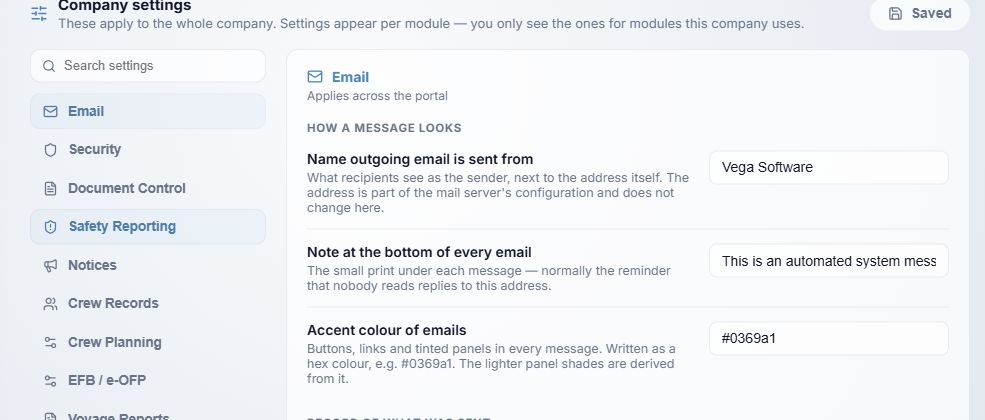
- Use the left section list or Search settings to find a control. A direct
/admin/settings/<section>link opens the same section; Vega also remembers the last section in this browser. - Change a switch, choice, number, or text value. Number controls show their unit and allowed range. A changed section shows an unsaved marker. Switching sections keeps the draft in this Settings screen.
- The current Email footer and Email accent color appear below the sender name. The company's values can differ from the shipped fallbacks.
- Save changes saves all pending Settings edits together. When there are no edits, it reads Saved and is disabled.
Reset to default restores the displayed default as a draft; it does not save immediately. Some switches ask how to activate a backlog; answer that prompt before saving. A secret is masked; its configured hint does not reveal the value. Leave a configured secret blank to retain it, or use the provided remove/undo controls if intentionally clearing it.
Before saving several changes, review every section marked unsaved. For module-specific options, see Document Control, Notices, and Safety Reporting. Crew Records and Planning and EFB, Voyage, Manuals, and add-ons are described in this Admin section.
The Sender display name is the name recipients see; it does not change the server's sender address. The shipped fallback is Vega Software. The Email footer adds an automated-message note unless customized. Email accent color accepts a #rgb or #rrggbb hex value; the fallback is #0369a1. Sent email delivery-record retention controls how long delivery records are retained, from 30 to 730 days, with a 180-day fallback. It does not set Audit Log retention. The screenshot shows the current local demo values, which may be configured differently at your company.
Security
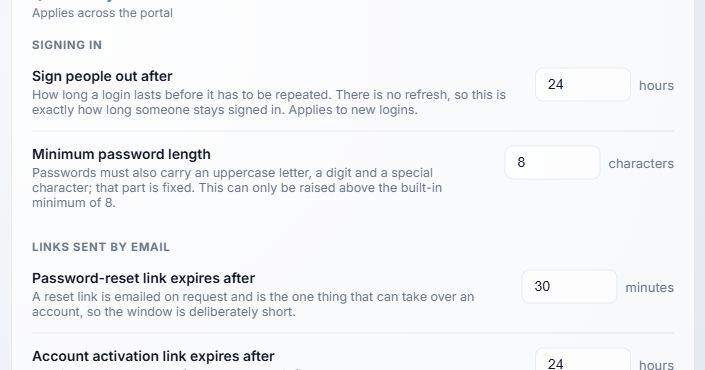
- Session lifetime controls newly created sign-in sessions, from 1 to 48 hours; the shipped fallback is 24 hours. It does not retroactively reissue an existing session.
- Minimum password length accepts 8–32 characters; fallback 8. The uppercase letter, digit, and special-character rules still apply independently.
- Password reset link lifetime accepts 10–120 minutes; fallback 30 minutes. After expiry, request another reset link.
- Account activation link lifetime accepts 1–72 hours; fallback 24 hours. An administrator can resend an expired user invitation from Users.
If Save changes rejects a value, check the displayed range and format. If a setting is absent, check the licence and your SETTINGS_MANAGE permission. Avoid putting credentials into a text setting or a screenshot; use only the masked secret control intended for credentials.