Crew Records and Crew Planning settings
For: Administrators with SETTINGS_MANAGE; Crew Planning managers should also review the effect on published rosters. Checked: Vega v1.126.2, 8 October 2026.
Use Admin Console → Settings → Crew Records or Crew Planning. See how Settings saves before changing multiple sections. A shown value may be company-specific.
Crew Records
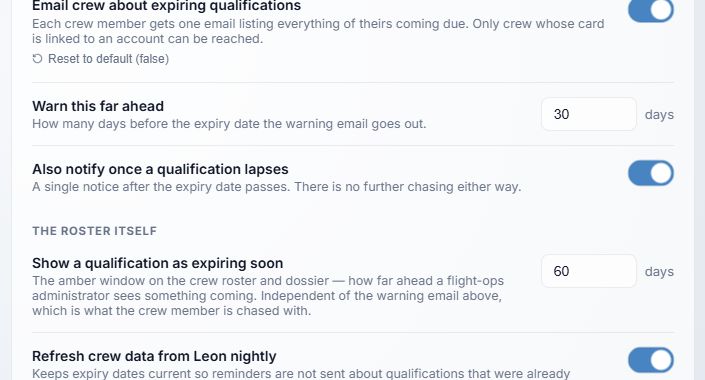
- Email expiry reminders has a shipped default of off. When turning it on, choose whether to Start quiet (recommended: mark the existing backlog as already notified) or Send backlog (eligible old reminders can be sent in the next sweep, within about 12 hours). Only crew records linked to an account can receive email. The demo has this switch on, so its Reset to default (false) control is visible.
- Warn ahead sets when expiry reminder email starts, 1–365 days before expiry; fallback 30 days.
- Also notify once lapsed is on by default. It adds an expired-state notification when eligible.
- Expiring soon badge uses its own 1–365-day window; the demo shows 60 days. It changes the on-screen badge and is independent of the email warning window.
- Nightly Leon sync is on by default when the integration is available. Turning off the schedule does not remove manual sync. Check add-ons for connection status.
Crew Planning
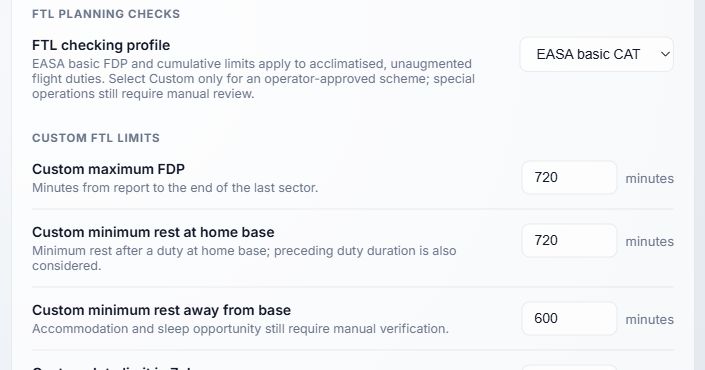
- FTL checking profile starts at EASA basic CAT. This performs basic checks for acclimatised, unaugmented flight duties; it does not replace an approved operator scheme or manual review. Select Custom only for an operator-approved scheme.
- Custom maximum FDP has a 720-minute fallback, measured from report to the end of the last sector.
- Custom minimum rest at home base has a 720-minute fallback. The preceding duty duration is also considered.
- Custom minimum rest away from base has a 600-minute fallback. Accommodation and sleep opportunity need manual verification.
Above the pictured FTL controls, Published roster visibility starts at Only my assignments. All published assignments broadens what crew can see in the published viewer. Check the company's privacy policy before changing it. Other custom FTL fields cover duty and flight totals over rolling and calendar periods; they matter when Custom is selected. Check the displayed units, ranges, and approved scheme. A custom scheme also needs its Competent authority and Approved FTL scheme reference; the fallback fields are empty. Numeric limits alone do not establish approval.
After a change, review the Crew Planning publication checks with a controlled draft. The displayed planning checks are decision support and require a human operational review before publication.