Respond to an assigned safety task
For: Anyone assigned a follow-up by the SMS team
Last checked: 7 October 2026, fictional local demo v1.126.2 and current source
Assigned to Me appears once you have a safety assignment. Its badge counts assignments that still need your answer on open reports. An assignment email can open a task directly. One report can have several separate tasks.
Open and review the task
- Open Safety Reports → Assigned to Me. Read the Assigned, Type, Occurrence date, Assigned by, Task and Status columns. Use Per page and pagination for a long list.
- Select the row or chevron to expand it. Read Your task from SMS, then check occurrence time (UTC), division, flight, location and Description (de-identified).
- If Files from the reporter appears, select a file chip to download it. SMS decides whether to share report attachments with each assignment. A missing file list does not prove the original report had no files.
- Check any existing Your response text and attached files. A response recorded by SMS on your behalf is labelled as such.
Send findings or a follow-up
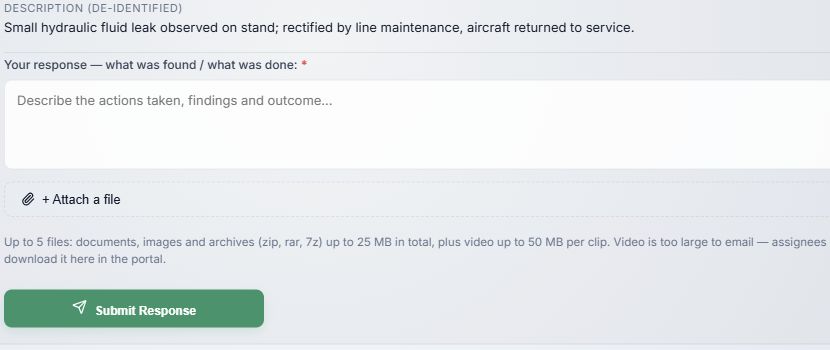
- Your response — what was found / what was done is required for the first answer. Explain actions, findings and outcome. A report can be closed only after every assigned response has been recorded.
- + Attach a file adds evidence. The file picker and size rules match report submission; a chip's × removes a selected file before sending. Video is downloaded from the portal rather than emailed.
- Submit Response uploads the files and sends your answer to SMS. Watch the progress bar; Cancel stops an unfinished upload. Wait for the success message.
After an answer, the button becomes Send Follow-up and new text is appended to your previous response rather than replacing it. The SMS team receives a notification when all assignees have answered. Answered appears in the task list. If SMS recorded an answer on your behalf, you can still add your own follow-up while the report is open.
When the report is closed, the task shows Closed, even if you did not answer, and no more responses can be added. If the text of a legacy report is unavailable, contact the SMS team. A failed or cancelled upload does not send the answer; retry after checking the error.