Review and publish a crew roster
Who can use this: Crew planners with Create and publish crew rosters access. Last verified: Vega local demo v1.126.2 and current publication logic, 8 October 2026.
Publishing releases a snapshot of the selected UTC week. The fictional illustrated week was published as Revision 1 for documentation only; its review statement explicitly disclaims operational approval.

- In Flights, verify the Monday–Sunday week at the top. The summary counts flights, assignments, and flights needing review. Select Needs attention to focus on incomplete or blocked flights, and open each flight to correct its duty, aircraft, or crew assignments.
- Publication checks summarizes FTL blocks and review items. Expand it before publishing. A missing duty, incomplete crew complement, FTL block, or incomplete custom FTL profile keeps Publish roster disabled. A week with no flights also cannot be published.
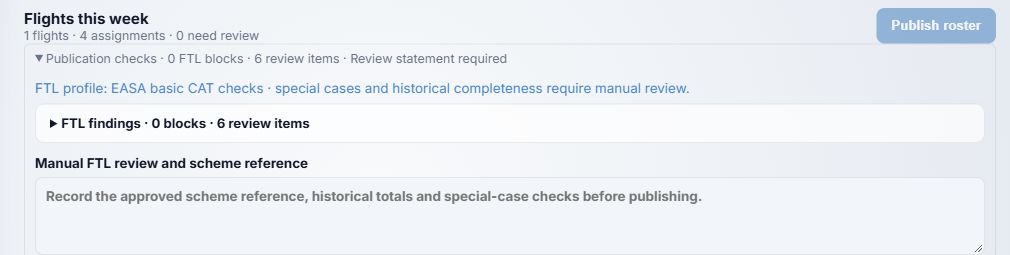
- Read the FTL profile and expand FTL findings to see each block or review item. The system checks the recorded plan for overlap, crew complement, available Crew Records qualifications, and basic FDP, rest and rolling limits. It cannot determine complete compliance with every applicable FTL scheme or unrecorded history.
- When review items remain, enter Manual FTL review and scheme reference (20–1000 characters). Record the approved scheme reference and the manual checks actually completed, including historical totals and special cases. The note is saved with the revision and displayed in the published roster. A note does not clear a BLOCK or substitute for the operator's approval process.
- Once checks allow it, choose Publish roster, read the confirmation showing the week, and confirm. Open Published roster to verify the new revision number, publication time, visibility, review note and flights. The Print button opens the browser print dialog. Later draft edits do not change this snapshot; publish again to issue the next revision.
If publication remains disabled, reopen Publication checks and resolve each missing duty, coverage issue, block or short review statement. Contact your administrator if the required fleet or Crew Records configuration is unavailable. See Build the weekly draft and View a published roster.