Permissions Matrix, Diagnostics, and System
For: Staff with PERMISSIONS_MATRIX_VIEW, DIAGNOSTICS_VIEW, or USER_MANAGE, respectively. Checked: Vega v1.126.2, 8 October 2026.
Permissions Matrix
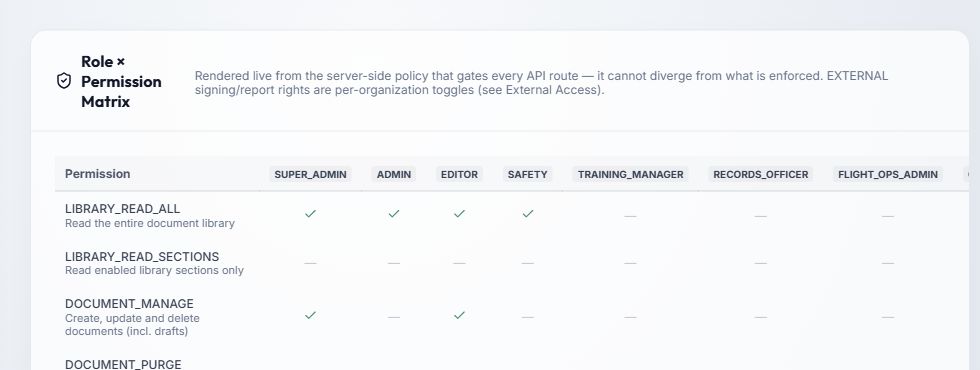
- The Permission column lists enforced action IDs and their plain-language labels. Read across a row to see which roles have that action; a check means granted and a dash means absent. Scroll the table horizontally on a narrow screen.
- The matrix comes from the server's current policy and is read-only here. To change one person's role, use Users. Check document editor section scope and distribution group membership separately.
- EXTERNAL document-signing and safety-report actions also depend on switches on the external organization. A matrix check alone does not override organization scope, expiry, or suspension.
When a control is missing, find its permission row, then check the person's roles. If the role should grant it but the module is absent, check the company's licence in System and the user or organization scope. See missing module or action.
Diagnostics
Select Refresh to reload current status. The cards show Application version/environment/uptime, Database & schema reachability and migrations, Scheduler last run, Storage capacity, Email (SMTP) configuration, Undelivered email, and Licence health. Expand an information hint where shown for more context. A stale scheduler run, failed delivery, unreachable database, or low storage should be reviewed with the technical administrator. Diagnostic values can include internal hosts and paths, so this public guide does not reproduce a live Diagnostics screenshot.
Send test email to me asks the server to send a real message to your account. Use it to check SMTP delivery, then review the result and the Undelivered email card. Refresh reads status; it does not repair a failed service. A test email failure can indicate mail configuration or delivery problems and does not by itself identify which component failed.
System
The Module License card summarizes licensed modules and their status. A role change cannot make an unlicensed module appear. The Security Ledger Monitor summarizes audit/security ledger state; use Audit Log for event-level review. These cards provide status information, not a place to assign product roles or change the licence. For changes to user access, return to Users.