Check document read tracking
For: Document controllers and auditors with compliance-view access
Before you start: Find a document that requires acknowledgement in Document Library.
Last checked: 7 October 2026, fictional local demo v1.126.2 and current report code
The Acknowledgement report icon opens Read tracking for a document's current revision. It is available only when acknowledgement is enabled and your account can view compliance data. This report contains personal recipient information; handle any exported copy under your company's rules.
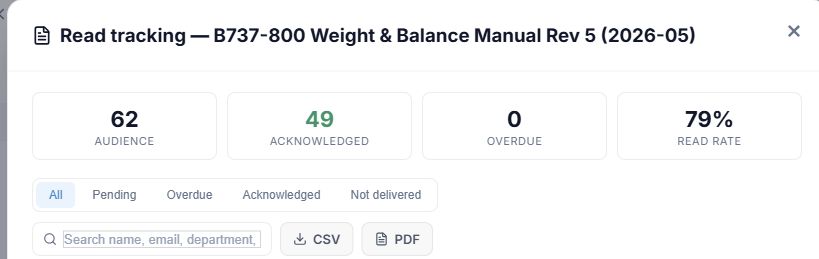
Figure 1. 1 — Document title: check which file the report belongs to. 2 — Summary: Audience, Acknowledged, Overdue, and Read rate. 3 — Status buttons: All, Pending, Overdue, Acknowledged, Not delivered. 4 — Search: narrows the recipient list by name, email, department, or group. 5 — CSV and PDF: export the report. × closes it.
- Select Acknowledgement report on the document row or card. The dialog title starts Read tracking — followed by the document title.
- Read the four summary tiles. Audience is the current recipients, Acknowledged is the number signed, Overdue is the number still unsigned past their due date, and Read rate is the acknowledged share of the audience. A zero-person audience shows 100% by the current formula; always check Audience before interpreting that percentage.
- Select All for the complete list; Pending for unsigned recipients; Overdue for late recipients; Acknowledged for those who signed; or Not delivered for people whose last document email failed. Pending can include overdue people; these filters are not mutually exclusive categories. Changing the filter returns to page 1.
- Type in Search name, email, department, group… to narrow the currently selected status. Read Name, Department / Groups, Status, Email, and Signed / Due in each row. Email shows the last send status; Not delivered means the announcement failed, not that the person ignored it. A dash means there is no value to show.
- Use Previous page, a page number, Next page, Go to, or Per page below the table when the list is long. CSV exports a data file; PDF exports a branded report. The on-screen search and status filters help inspect the list; verify the scope of an export separately before sharing it.
When email failures are shown, check the Not delivered filter and the affected addresses. Correct the underlying address or delivery issue and use Notify Recipients when the document can be announced again. Sending an email does not create an acknowledgement; only the recipient's separate signature does.