Understand the Company Compliance dashboard
Who can use this: Staff with permission to view Company Compliance, such as an administrator, document controller, or auditor. The Documents module must be available to your company. Last verified: Vega local demo v1.126.2, 8 October 2026.
Company Compliance shows document acknowledgement progress. Its percentage is based on required acknowledgements of published documents; it is not an assessment of regulatory compliance, training, or operational safety.
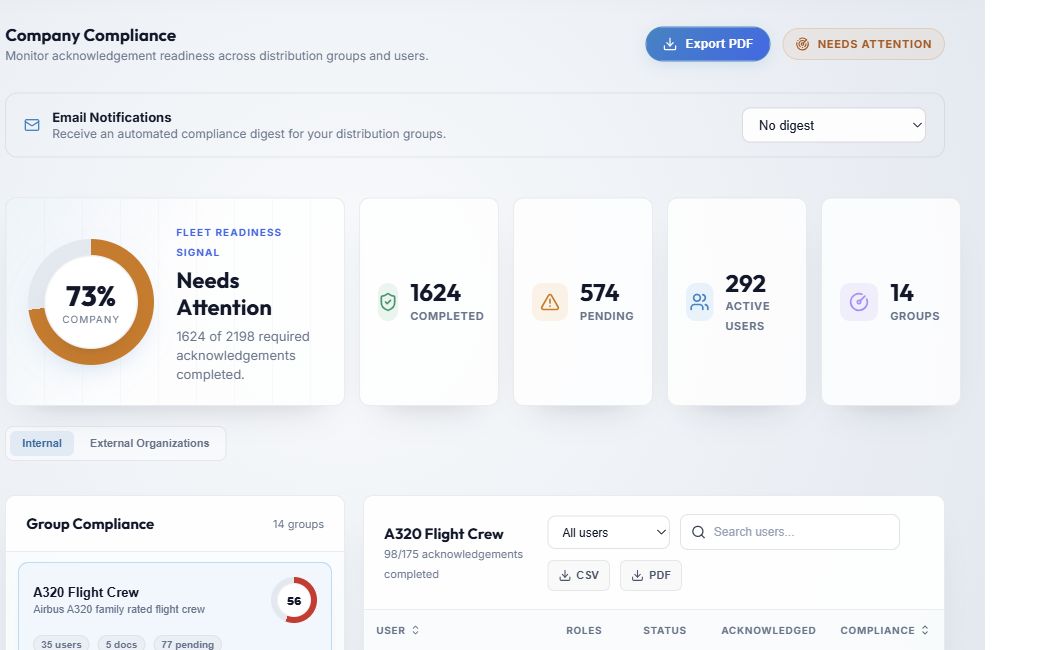
- Company Compliance opens from the left menu. The company summary covers required acknowledgements across active company accounts. A document sent through more than one internal group is counted once per person in this overall figure; documents sent to a person directly are included.
- Export PDF downloads a company-wide snapshot. It is separate from the CSV/PDF controls for a selected group or external organization. Exporting is recorded in the audit log. The file can contain people's names and acknowledgement data; handle it as an internal record.
- Email Notifications controls your own automated digest. See Choose an email digest. It does not change other users' subscriptions.
- Company percentage is completed ÷ required acknowledgements, rounded down to a whole percent. Completed and Pending are the underlying counts; Active Users counts active company accounts in the report; Groups counts distribution groups.
- The Fleet Readiness Signal label is a visual aid derived from the percentage: Operationally Ready at 90–100%, Needs Attention at 70–89%, and Action Required below 70%. It does not replace your organization's compliance judgment.
- Internal shows distribution groups and their members. External Organizations shows partner organizations separately. Switching tabs does not change the company percentage above them.
How the figures change
- An obligation is created when a published document requires acknowledgement and is distributed through a group or addressed directly to a person. Acknowledging that version moves one obligation from Pending to Completed.
- The group figures cover documents distributed to that group. The company figure also includes personally addressed documents. A person's group row can therefore show a different rate from their full detail page.
- A group with 0 docs or no active members can show 100% because it has no outstanding obligation. It does not mean someone reviewed its procedures.
- A later published version can create a new acknowledgement obligation. Deleted documents are removed from the current report. See Revisions and distribution status.
- The dashboard is calculated when it loads. If a colleague signs while you are viewing it, reopen Compliance or refresh the page to see an updated report.
Next: Review internal groups or Review external organizations.