Find an assigned flight and open a released OFP
For: Flight crew with tablet access
Last checked: 7 October 2026, local Vega demo v1.126.2. The empty roster was checked in the running demo; the download and briefing steps were checked against the current tablet interface code.
The Vega tablet client shows flight sectors assigned to you after dispatch has released an OFP package. A crew assignment by itself does not make an unreleased package available.
Open your flight
- Sign in to your company's Vega portal and select the tablet button in the header, or open the tablet address supplied by your company.
- On My flights, select Refresh if you expect a recently released sector.
- Find your flight by flight number, date, route, and aircraft. A released package is marked OFP released.
- Select Download for that sector. Wait for the download to complete before opening the flight card. If a newer released revision appears later, select Update to get it.
- Select the flight card. The briefing opens at Pre-flight. Use the flight navigation to review Nav log, Weather & NOTAM, Docs, and the other sections relevant to your task. Check the revision shown on the device.
Only the assigned commander can use Sign and accept for the package. The commander must review the package, enter the block fuel taken, provide a reason if the difference exceeds the configured tolerance, and sign in the box. Other crew members can see the acceptance status but cannot sign on the commander's behalf.
If My flights is empty
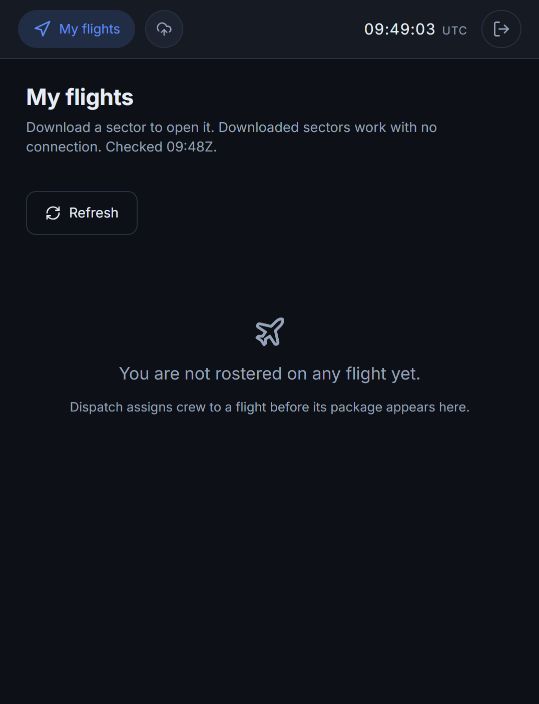
- Check that you are signed in with the account assigned to the flight, then select Refresh while connected.
- Ask dispatch to verify that your crew assignment is active and that the OFP revision has been released to the flight deck. A revision waiting for release is not enough.
- Refresh My flights after dispatch confirms release. If the flight still does not appear, give support the flight number and date through your company's normal support channel.
Do not use a draft, validated, or quarantined OFP as a released flight-deck package.